

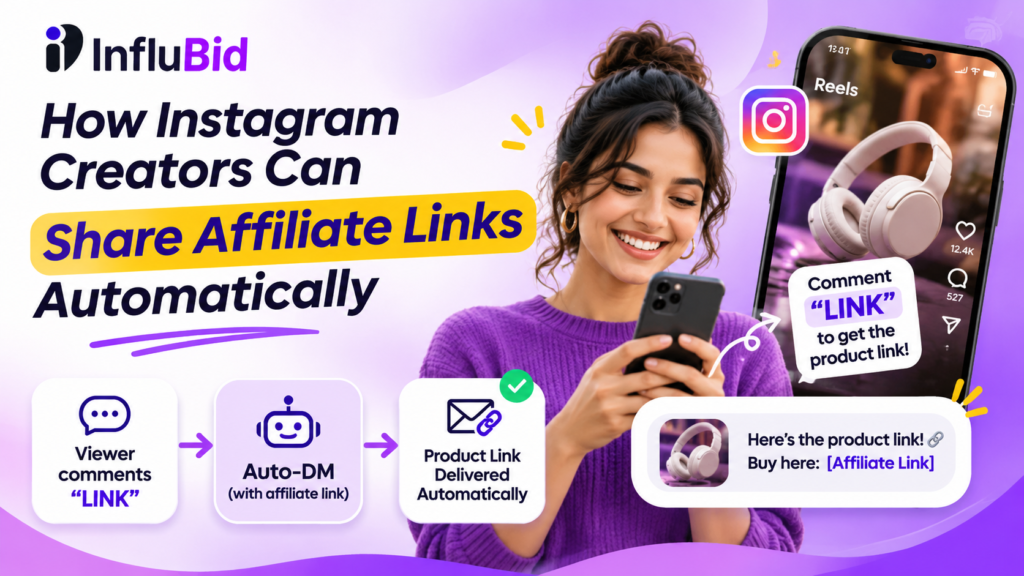
Turn Your Instagram Product Recommendations into a More Efficient Affiliate Workflow
Have you ever published an Instagram Reel featuring a product and received dozens of comments asking for its purchase link?
“Link please!”
“Where can I buy this?”
“Send me the product details!”
These comments can indicate that viewers are interested in the products you feature. But when you promote different products across multiple Reels, manually finding and sending every link can become difficult.
For affiliate creators, there’s a better way to organize this process.
You can use Instagram comment-to-DM automation to share relevant affiliate links with people who request them.
With Linkflow by InfluBid, you can configure supported automation workflows to respond to eligible interactions and deliver the information your audience is looking for.
In this guide, we’ll focus on how to build a more organized affiliate-link workflow—from selecting products and preparing tracking links to measuring results and disclosing affiliate relationships.
What Is Affiliate Marketing on Instagram?
Affiliate marketing is a promotional model in which you recommend products or services using tracked links.
When someone completes a qualifying action, such as making a purchase through your affiliate link, you may earn a commission according to the affiliate program’s terms.
Here’s how the process typically works:
- Join an affiliate program.
- Choose a product that fits your audience.
- Generate your unique affiliate tracking link.
- Create Instagram content showcasing the product.
- Share the relevant link with interested viewers.
- Review your affiliate dashboard to track qualifying clicks, purchases, and commissions.
Your earnings depend on the affiliate program, product, audience, qualifying actions, and applicable terms.
Automation doesn’t generate commissions by itself. Its role is to make it easier to deliver the right information when someone expresses interest.
Why Affiliate Creators Should Automate Product-Link Delivery
1. Give Viewers the Exact Product They Asked For
Suppose you publish three Reels in one week:
- One featuring wireless headphones.
- Another showcasing a kitchen gadget.
- A third reviewing a phone accessory.
Each Reel has a different product link.
A well-organized automation workflow can deliver the appropriate link for each promotion rather than requiring you to search through messages and paste URLs manually.
The key is matching the response to the product featured in the original content.
2. Make Your Product Recommendations Easier to Act On
Someone might discover a product while watching your Reel but have no idea where to buy it.
A clear call to action—such as asking viewers to comment with a keyword—gives interested people a simple way to request more information.
You can then configure a supported automation to deliver the relevant product page.
3. Handle Multiple Product Promotions More Consistently
Creators who publish frequently may promote several products across different categories.
Organizing your links and automation rules helps you avoid sending the wrong product URL or forgetting to respond to requests.
Keep a record of the product, its affiliate URL, the Reel promoting it, and the corresponding automation rule.
4. Understand the Difference Between Engagement and Affiliate Revenue
An automation dashboard may show replies sent, users reached, follows gained, and other engagement-related information.
However, these metrics are not the same as affiliate clicks, confirmed purchases, or commission revenue.
To evaluate your affiliate strategy, combine your automation analytics with the reporting provided by your affiliate program.
This gives you a clearer view of the journey from a viewer’s interest to a potential purchase.
How to Share Affiliate Links Automatically on Instagram
Let’s walk through an affiliate-specific workflow.
Step 1: Choose a Product Your Audience Actually Needs
Start with your audience—not the commission percentage.
Ask yourself:
- Does this product fit my niche?
- Can I explain why someone might find it useful?
- Have I evaluated the product sufficiently to recommend it honestly?
- Does the product offer a clear benefit to my audience?
- Does the affiliate program permit promotion through Instagram?
- Can I disclose my affiliate relationship clearly?
For example, a technology creator might recommend a phone accessory that solves a problem regularly discussed by their followers.
A food creator might feature a kitchen tool that makes a recipe easier to prepare.
Relevant recommendations are more useful than random product promotions.
Step 2: Generate and Organize Your Affiliate Links
Join the relevant affiliate program and obtain your unique tracking link.
Depending on the program, you may receive a product-specific URL or generate one through an affiliate dashboard.
Before using the link, check that it:
- Opens the correct product page.
- Includes the expected affiliate tracking information.
- Works on mobile devices.
- Leads to the intended destination.
- Complies with the affiliate program’s rules.
For creators promoting several products, a simple link register can help prevent mistakes.
| Product | Content | Affiliate link | Automation keyword |
|---|---|---|---|
| Wireless headphones | Headphone review Reel | Headphone affiliate URL | HEADPHONES |
| Kitchen gadget | Cooking demonstration | Kitchen product URL | KITCHEN |
| Phone accessory | Smartphone tips Reel | Accessory affiliate URL | ACCESSORY |
Replace the example values with your actual products and links.
This table is an organizational example, not a claim that Linkflow automatically creates or maintains an affiliate-link database.
Step 3: Create Content That Demonstrates the Product
Your Reel should give viewers a reason to be interested in the product.
Instead of simply displaying a product and asking people to buy it, demonstrate how it works, explain its useful features, or share an honest review.
For example, a tech creator could show how a phone accessory makes recording videos easier.
A useful call to action might be:
“Want to check out the exact accessory I used? Comment ACCESSORY and I’ll share the product page!”
Make sure the caption and video accurately represent what the viewer will receive.
Step 4: Configure a Relevant Linkflow Automation
Visit Linkflow by InfluBid and connect your supported Instagram account through the available authorization process.
Then configure an appropriate automation rule for the relevant post or Reel.
For example:
Featured product: Wireless headphones
Comment keyword: HEADPHONES
Automated response: “Thanks for your interest! Here’s the product page: [your affiliate link].”
Use your actual tracked affiliate URL in the configured message.
The available triggers, post coverage, and automation options depend on Linkflow’s current interface, your account connection, and your plan.
If you need a more detailed walkthrough of comment triggers, message configuration, and testing, see our separate guide: How to Automatically Send Instagram DMs When Someone Comments on Your Reel.
That guide focuses on setting up comment-to-DM automation. This article focuses on using that workflow for affiliate marketing.
Step 5: Test the Entire Affiliate-Link Journey
Before promoting the automation to your audience, test the complete workflow.
Check that:
- The correct Reel is selected.
- The intended trigger is configured.
- The expected response is delivered for an eligible interaction.
- The affiliate URL opens the correct product page.
- The affiliate tracking information is preserved where expected.
- The message complies with applicable platform and affiliate-program requirements.
A message being delivered successfully doesn’t necessarily mean the affiliate link is tracking correctly.
Where possible, use the affiliate program’s approved testing or reporting features to confirm that links are functioning as intended.
Step 6: Measure Clicks, Purchases, and Commissions
Once your Reel is live, review the performance of your automation and affiliate links.
Consider tracking the following metrics separately:
| Metric | What it tells you |
|---|---|
| Reel comments | How many comments your content receives |
| Automated replies | How many responses your automation sends |
| Affiliate link clicks | How many tracked clicks the affiliate platform records |
| Qualifying purchases | Purchases that meet the program’s requirements |
| Confirmed commissions | Earnings credited under the affiliate program’s terms |
These numbers represent different stages of the journey.
For example, 100 automated replies do not necessarily mean 100 clicks or 100 purchases.
If you receive many comments but few recorded clicks, review the message, call to action, link placement, and product relevance.
If clicks are strong but qualifying purchases are low, consider whether the product, price, product page, or audience intent is a good match.
Use the reporting provided by your affiliate platform to verify actual affiliate performance. Do not treat automation analytics as proof of sales unless the relevant sales-tracking capability is explicitly supported.
5 Affiliate Marketing Ideas for Instagram Creators
1. Technology and Gadget Recommendations
Demonstrate phone accessories, electronics, recording equipment, or productivity gadgets.
Explain the problem a product solves and show it in action.
Call-to-action example: “Want the exact gadget I used? Comment GADGET.”
Your configured response can share the corresponding product page.
2. Fashion and Beauty Products
Create outfit breakdowns, styling tips, beauty routines, or product comparisons.
Organize links for the products actually featured in each Reel so interested viewers receive relevant information.
Call-to-action example: “Want the details of this outfit? Comment OUTFIT.”
Avoid unsupported claims about product performance or results.
3. Home and Kitchen Products
Show practical household items in use.
A demonstration of a kitchen tool, storage accessory, or cleaning product can give viewers a reason to request more information.
Call-to-action example: “Want to see the product I used? Comment KITCHEN.”
4. Books and Educational Resources
Recommend books, learning resources, or tools relevant to your niche.
Explain who might benefit from the resource instead of relying entirely on a sales pitch.
Call-to-action example: “Want to check out this book? Comment BOOK.”
5. Software and Digital Services
Create tutorials showing how a software product or digital service can help your audience.
Where the affiliate program permits it, your automated response can direct interested viewers to the relevant product page.
Call-to-action example: “Want to explore this tool? Comment TOOL.”
Always confirm that your affiliate program permits the intended promotional method.
Important: Disclose Affiliate Relationships Clearly
If you may earn a commission from purchases made through your links, make that relationship clear to your audience.
For example:
“This is an affiliate link. I may earn a commission if you purchase through it, at no additional cost to you where applicable.”
The exact disclosure requirements depend on the applicable rules and the affiliate program.
Make disclosures prominent and easy to understand. Depending on the content and applicable requirements, this may mean including a disclosure in your caption, video, or other relevant promotional material.
Don’t assume that placing a disclosure only on a separate webpage is sufficient.
Creators promoting products to Indian audiences should review the applicable advertising-disclosure guidance, including the Advertising Standards Council of India (ASCI), and follow their affiliate program’s requirements.
Your recommendation should also be honest. Do not claim that you’ve used a product if you haven’t, and avoid misleading statements about its features or results.
Can You Use Linkflow for Affiliate Marketing for Free?
Linkflow offers a Free plan, which can be useful for creators who want to explore supported Instagram automation without immediately paying for a subscription.
The previously listed Free-plan features include comment-reply automation, direct-message automation, follow funnels, and analytics, with automation configured for one post at a time.
The Pro plan has been described as offering broader automation across posts and additional supported triggers and filtering options.
Because prices, feature limits, and plan details can change, check the official Linkflow page for the current offering before choosing a plan.
If you’re unsure whether a free plan is enough for your needs, read our comparison: Free vs. Paid Instagram Automation Tools: What Should Creators Choose?.
Frequently Asked Questions
Can I automatically send an affiliate link when someone comments on Instagram?
You can configure a supported comment-to-DM workflow to deliver a relevant link following an eligible comment interaction. The workflow must comply with Instagram’s permissions and messaging rules.
Do I need an affiliate account before setting up automation?
You should obtain a valid affiliate link from the relevant program before configuring an automation intended to distribute it.
Does Linkflow track affiliate sales and commissions?
Linkflow provides automation analytics. However, automation metrics should not be treated as affiliate clicks, confirmed purchases, or commissions unless the relevant tracking integration is explicitly supported.
Use your affiliate program’s reporting to verify clicks, qualifying purchases, and earnings.
Can I use Linkflow for free?
Linkflow offers a Free plan. Check the official page for current features, limits, and terms.
Will automated affiliate links guarantee more sales?
No. Automation can make product information easier to deliver, but sales depend on audience interest, product quality, pricing, trust, and the overall shopping experience.
Can I send different affiliate links for different Reels?
You can configure appropriate rules for supported posts and triggers, depending on the available Linkflow features and your plan. Make sure each automation sends the correct link for the product featured in its content.
Should I automate every product recommendation?
Not necessarily. Automation is most useful for repetitive requests where a predefined response provides genuine value. Personal questions, detailed product concerns, and sensitive issues may require an individual response.
Build a More Organized Affiliate Workflow
You don’t have to choose between creating useful content and manually responding to every person who requests a product link.
With Linkflow by InfluBid, you can configure supported Instagram automation workflows to deliver the information your audience requests.
Start with one relevant product, create a useful Reel, prepare a valid affiliate link, configure the appropriate automation, and review the results.
Remember: automation makes link delivery easier, but honest recommendations, audience trust, and relevant content are what make an affiliate strategy sustainable.
Get started with Linkflow for free.
Linkflow by InfluBid — helping creators simplify Instagram engagement.
Ready to run campaigns differently?
Bring your next campaign into one connected workflow with InfluBid.
Get Started Explore InfluBid
2 comments