

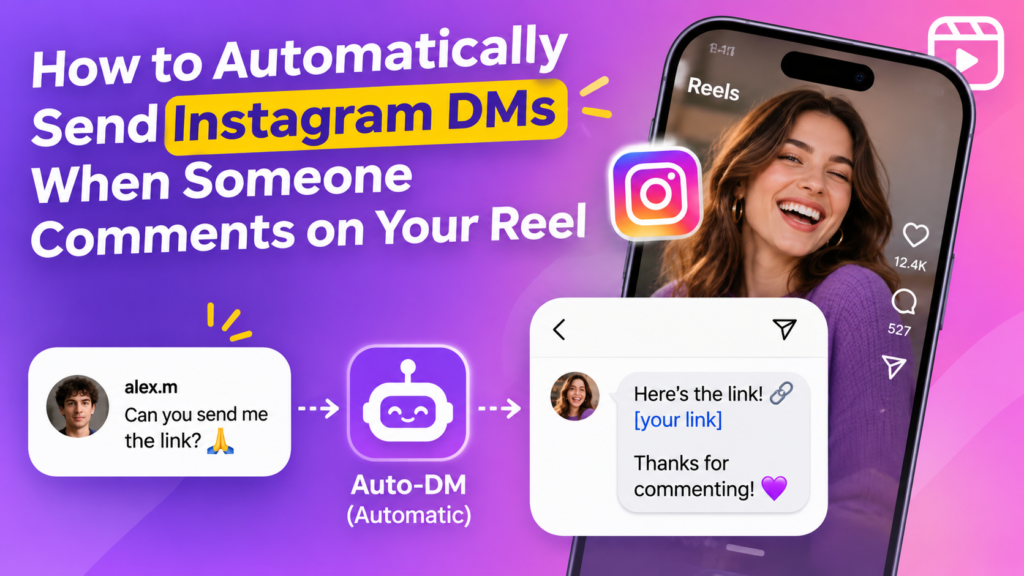
Tired of Sending the Same Instagram DM Again and Again?
Imagine posting a Reel that starts getting hundreds of comments.
People are asking for your product link, requesting your free guide, or wanting to know where they can buy something you featured.
You want to reply to everyone, but manually opening profiles, finding comments, and sending individual messages takes time.
What if you could automatically respond to eligible comments and send people the information they requested?
With Instagram comment-to-DM automation, you can configure a workflow that sends a private reply when someone comments on your selected post or Reel, subject to Instagram’s messaging rules and permissions.
That’s where Linkflow by InfluBid can help.
What Is Instagram Comment-to-DM Automation?
Instagram comment-to-DM automation connects a comment on your content with an automated private response.
You select a supported post, configure the trigger, and write the message you want to send.
When someone leaves a matching comment, the automation handles the configured response, provided the interaction meets the platform’s requirements.
For example:
- You publish a Reel featuring a useful product.
- Your caption says, “Comment LINK to get the product details.”
- A viewer comments LINK.
- Your configured automation sends a private reply containing the relevant information.
Instead of manually responding to every matching comment, you let an automation rule handle the repetitive part.
This can be useful for creators who share product recommendations, tutorials, digital resources, recipes, or promotional content.
Why Should Instagram Creators Automate Their DMs?
1. Stop Repeating the Same Replies
If viewers repeatedly ask for the same information, you don’t need to type the same response every time.
Configure an automation rule to handle eligible interactions while keeping your time free for more valuable conversations.
2. Make Product Links Easier to Access
When someone asks where to buy a featured product, an automated response can provide the relevant link.
This is particularly useful for creators who publish product reviews, shopping recommendations, or affiliate content.
If affiliate marketing is part of your strategy, read our guide on how to share affiliate links automatically on Instagram.
3. Deliver Free Resources
Do you offer a PDF guide, checklist, recipe, template, or other digital resource?
Invite viewers to comment with a relevant keyword, then configure an automated response that shares the resource.
4. Manage Engagement More Efficiently
Automating repetitive replies frees up time for planning content, recording Reels, editing videos, and interacting personally with your audience.
Automation should support genuine engagement, not replace every human conversation.
How to Automatically Send Instagram DMs When Someone Comments on a Reel
Follow this general workflow to configure comment-to-DM automation with Linkflow.
Step 1: Open Linkflow by InfluBid
Visit the official Linkflow page and create an InfluBid account if you haven’t already.
Linkflow offers a Free plan, allowing eligible creators to explore its core automation features without immediately purchasing a subscription.
Step 2: Connect Your Instagram Account
Follow the account-connection process and authorize the permissions requested by the integration.
Make sure your account meets the requirements displayed during setup.
Review the permissions carefully and only authorize access you understand and are comfortable granting.
Step 3: Choose the Post or Reel
Select the content you want to use for your automation.
For example, if you’ve published a Reel about a skincare product, you can create an automation around that Reel.
The Free plan has been described as supporting automation on one post at a time, while Pro offers broader post coverage. Check the current Linkflow plans for the latest limits.
Step 4: Configure Your Trigger
Choose the supported comment trigger and configure a keyword or another available matching condition.
For example:
Keyword: GUIDE
Your Reel caption could say:
“Want my beginner’s guide? Comment GUIDE below!”
Choose a keyword that clearly relates to the information you’re offering. Avoid confusing instructions that might cause people to comment without understanding what they’ll receive.
Step 5: Write Your Automated Reply
Prepare a message that delivers the information promised in your Reel.
For example:
“Thanks for your interest! Here’s the guide you requested: [your resource link]”
Keep the message concise, relevant, and easy to understand.
Before activating the rule, test the destination link and make sure it leads to the correct resource.
Step 6: Test Your Automation
Test the workflow using an eligible interaction.
Confirm that:
- The correct post or Reel is selected.
- The intended trigger is configured.
- The expected message is sent.
- The destination link works.
- The workflow respects applicable Instagram messaging restrictions.
If the automation doesn’t work as expected, review your account connection, permissions, trigger settings, and message configuration.
Step 7: Publish Your Reel and Invite Comments
Once your workflow is ready, include a clear call to action in your caption or video.
For example:
“Comment TEMPLATE to receive the resource!”
After publishing, review the available automation analytics to understand how the rule performs.
Important: The exact controls, triggers, and plan limits depend on your account connection, the current Linkflow interface, and the features available to your account.
5 Ways Creators Can Use Comment-to-DM Automation
Example 1: Fashion Creators
Publish a Reel featuring an outfit.
Caption idea: “Want the outfit details? Comment OUTFIT!”
Your configured response can share the relevant product page or outfit information.
Example 2: Tech Reviewers
Publish a gadget review.
Caption idea: “Looking for the product link? Comment LINK!”
Use the automation to share the product page with eligible commenters.
Example 3: Educational Creators
Publish a tutorial.
Caption idea: “Want the complete checklist? Comment CHECKLIST!”
Send the requested resource through the configured response.
Example 4: Food Creators
Share a cooking Reel.
Caption idea: “Want the full recipe? Comment RECIPE!”
Configure the response to provide the recipe page.
Example 5: Digital Product Creators
Promote an ebook, template, or downloadable resource.
Caption idea: “Interested in the template? Comment TEMPLATE!”
Direct interested viewers to the appropriate product page or information.
These examples illustrate possible workflows. Automation alone does not guarantee purchases, conversions, increased reach, or additional followers.
Is Instagram Comment-to-DM Automation Allowed?
Instagram automation must comply with Meta’s platform rules, API requirements, and messaging permissions.
Meta provides supported private-reply functionality for certain comment interactions, subject to specific restrictions. This does not mean that every comment author can receive unlimited promotional messages.
Before choosing an automation tool, review Meta’s current requirements:
Avoid tools that require your Instagram password to perform unauthorized activities such as automated following, liking, or mass messaging.
Linkflow states that it uses Meta’s official APIs rather than scraping or unofficial endpoints. You should still review the current integration details and permissions before connecting your account.
How Much Does Instagram DM Automation Cost with Linkflow?
Linkflow offers Free and Pro plans. The precise feature limits and prices may change, so check the official Linkflow page before choosing a plan.
Free Plan — ₹0/month
The Free plan has been described as including:
- Unlimited automations.
- Comment-reply automation.
- Direct-message automation.
- Follow-funnel automation.
- An analytics dashboard.
- Automation on one post at a time.
- An “Automate by @influbid” attribution tag on automated replies.
Pro Plan
Pro has been described as adding features such as:
- Automation across posts.
- Comment-type filtering for images and GIFs.
- Excluded-word filters.
- Story-reply automation.
- Story-share automation.
- Post-share automation.
- Story-mention automation.
- Live-comment automation.
- Removal of the “Automate by @influbid” attribution tag.
Check the official Linkflow page for current Pro pricing and feature availability.
Choose a plan based on the number of posts you want to automate and the specific triggers you need.
Frequently Asked Questions
Can Instagram automatically DM someone who comments on my Reel?
Supported comment-to-DM workflows can send a private reply following an eligible comment interaction, subject to Instagram’s permissions and messaging rules.
Do I need coding skills to set up comment-to-DM automation?
No coding is generally required to configure supported automation workflows through Linkflow’s interface. Follow the setup instructions and available controls.
Can I automatically send an affiliate link to someone who comments?
You can configure an appropriate response to share an affiliate link when the workflow and platform rules permit it. Make sure your affiliate disclosures, message content, and destination comply with applicable requirements.
For more guidance, read How Instagram Creators Can Share Affiliate Links Automatically.
Can I use Linkflow for free?
Linkflow offers a Free plan. It has been described as including core automation features, with automation limited to one post at a time. Check the official page for the latest terms and limits.
Does comment-to-DM automation guarantee more followers or sales?
No. Automation helps manage interactions and deliver information, but results depend on your content, audience, offer, and overall strategy.
If your primary goal is audience growth, read How to Turn Instagram Reel Comments into Followers.
Should I choose a Free or Paid Instagram automation tool?
That depends on the features you need. If you’re deciding whether a free plan is enough or you need advanced automation, see Free vs. Paid Instagram Automation Tools: What Should Creators Choose?.
Start Automating Your Instagram Replies Today
You don’t need to spend your entire day answering repetitive questions under your Reels.
With Linkflow by InfluBid, you can configure supported automated responses, deliver useful links, and review how your automations are performing.
Start with one Reel and one useful offer. Test your workflow, learn from the results, and expand as needed.
Create your free Linkflow account.
Linkflow by InfluBid — Instagram automation built for creators.
Ready to run campaigns differently?
Bring your next campaign into one connected workflow with InfluBid.
Get Started Explore InfluBid
4 comments